Introduction :
Today almost every webmaster and
wapmasters where thinking about SEO ,
Because the feature of Top list's are getting
down and the best way of getting real and
organic clicks through Search Engines . To get
traffic from Search Engines wapmaster must
add their wapsite to Google Search Engine by
using their Sitemap . The sad news was Xtgem
don't have an option to generate Sitemap . But
by using an alternative method Xtgem members
can add their wapsite to Google Search Engine .
To learn the alternate way continue reading .
How to Add My Xtgem Wapsite to
Google Search Engine :
To add your Xtgem wapsite to Google Search
Engine you need to create Sitemap for your
Xtgem wapsite . Without creating Sitemap you
can't add your Xtgem wapsite on Google Search
Engine .
How to Generate Sitemap For My
Xtgem Wapsite :
To generate Sitemap for your Xtgem wapsite
you need to visit the following steps . I am
remanding you that Xtgem don't have an option
to generate Sitemap so we must use an
alternative method to generate Sitemap .
First of all you need to visit xml-sitemaps.com
Now follow the image steps that
displayed below this text . 
•First of all you need to enter your
site address on the Text-box which
show's the "http:// " and click on the
" Start" Button for generating
Sitemap .

•After click on the " Start" Button your
Xtgem site Sitemap will
automatically generate and will be
taken to a new page . After reaching
the new page you need to click on
the "Sitemap.xml " Link and
download the Sitemap for your
Xgem wapsite .
Uploading Sitemap to Xtgem Wapsite :
After generating Xml Sitemap for your Xtgem
wapsite you need to log in to your Xtgem
wapsite and upload the sitemap to your file-
manger .
Log in to your Xtgem A/c .
Enter to the site which you
generated Sitemap .
•
Click on the "File-Browser " & Click on
the "Upload File ".
•
Click on the "Upload File " Button .
•
Choose the " Sitemap" File and Upload
it .
•
After uploading the Sitemap file to
File-Browser go to the property's of
it and copy the url address of it .
•
Example : http://site.xtgem.com/
sitemap.xml
Adding your Xtgem site to Google
Search Engine :
After uploading the sitemap to Xtgem you need
to do the following steps on the Google
Webmaster Tools for adding your Xtgem
wapsite to Google Search Engine .
Log in to
=>Google Webmaster Tools
by using your Gmail A/c .
=>
Click on the "Add a Site " Red Button .
=>
Enter your Xtgem site adddress
including "www. " & Click on the
Continue Button .
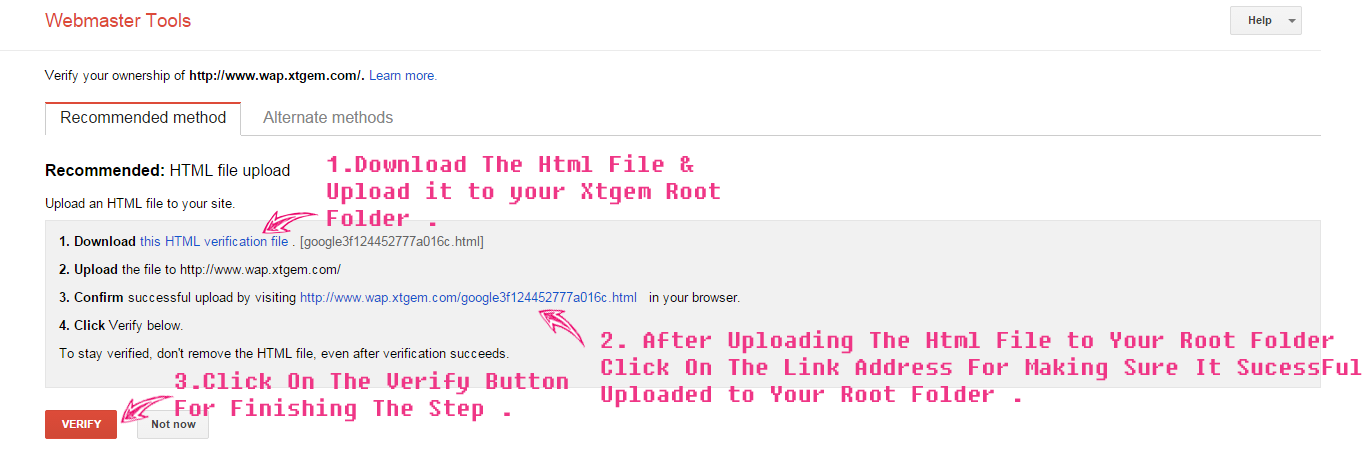
•Now you need to verify your Xtgem
wapsite on Webmaster Tools , For
that you need to download the "This
Html Verification File " & Upload to
your Xtgem File-Browser Root . After
Uploading the File click on the
" Verify " Button .
•
Now Enter to the site which you
added to the Google Webmaster
Tools from Webmaster Tools and
click on the "Sitemap " Tab .
•
Now click on the "Add/Test Sitemap"
Button and enter
the continue destination url
address there .
•
Example : "http://site.xtgem.com/
sitemap.xml" here the continue
destination url address is
" sitemap.xml " .
•
Click on the "Submit " Button .
You are Done .
UNDER MAINTENANCE







 0
0  Star
Star
Bentyl Mail Order Low Price Propecia Cause Prostata Viagra Salud Mental <a href=http://brandciali.com>where to buy cialis online safely</a> Td Bank